Still Copy-Pasting Data Into Documents?It's 2026. Why does your reporting process look like 2004?
Upload any report you create repeatedly. Our AI learns the structure, maps your data fields, identifies calculations to automate, and suggests improvements or completely transforms the layout. Do the manual work once. Just once. Then generate perfect reports forever.
The Hidden Cost of "How We've Always Done It"
Every industry has reports that get created over and over. Same format, different data. And in most workplaces, skilled professionals are still doing this manually: copying, pasting, formatting, checking, saving, repeating. It's the most hated part of modern work. Here's what the research shows:
The Time Drain
That's how long the average office worker spends on manual data entry and formatting tasks. Not analyzing. Not creating. Not thinking. Just copying and pasting data that could move itself.
The Error Factory
Manual work isn't just slow, it's unreliable. Transposed numbers. Wrong cells copied. Last month's data in this month's report. Every manual step is a chance for something to go wrong.
The Morale Killer
Data entry tops the list of tasks workers despise most. 47% find it boring. 48% consider it a waste of their skills. And 55% would leave a job if manual tasks became too much.
The Life Drain
Nearly half of workers say administrative tasks regularly prevent them from leaving when they should. The repetitive work follows them home or keeps them late.
The Consistency Problem
When every report is formatted by hand, none of them look quite the same. Different spacing here, wrong logo version there, fonts that don't match. Your work deserves a consistent, professional presentation every time.
The Opportunity Cost
That's a full week of productive time every single month lost to admin work that adds zero value. Multiply that across your team. Now multiply by your hourly rate. That's what this is really costing you.
Three Reasons Your Last Report Should Be Your Last Manual Report
Do It Once, Never Again
You've already created the perfect report format. You've positioned the logo, aligned the columns, set up the headers, figured out the spacing. Why do all that work again tomorrow?
Upload any report you've made and our AI learns the entire structure:
- What's static (headers, logos, boilerplate text)
- What's dynamic (data fields that change each time)
- What needs your input (signatures, custom notes)
Save it as a template. Next time you have new data, just upload it. Get a perfectly formatted report in seconds. Same structure, same professional look, zero manual work.
AI-Powered Transformation
Most template tools just copy what you give them. We do more.
Our AI assistant reviews your document and actively suggests improvements:
- Cleaner layouts and better visual hierarchy
- Improved readability and data presentation
- Modern formatting that actually looks designed
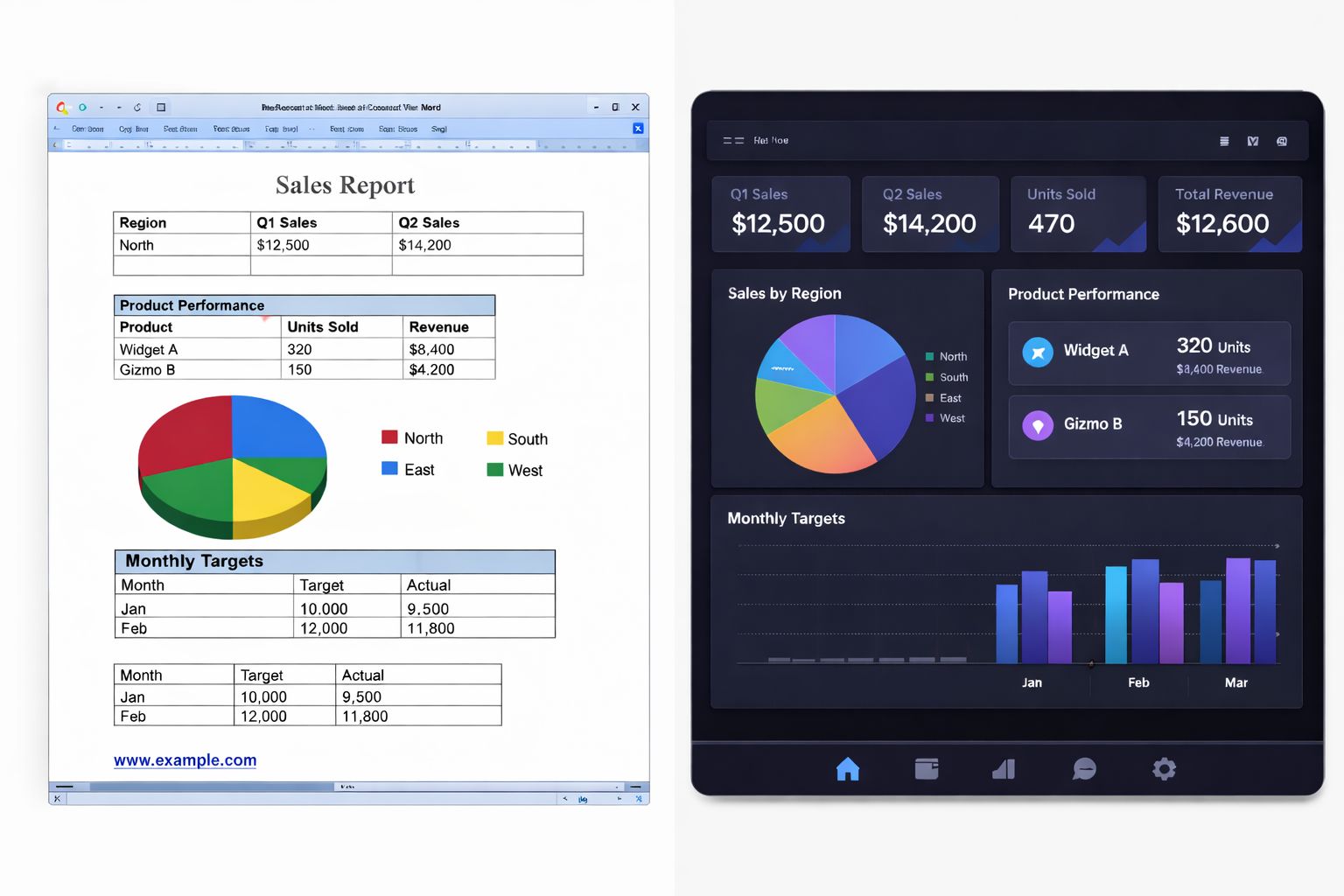
Or skip the suggestions and tell it exactly what you want. "Make the header blue and add a summary section." "Turn this Word doc into a clean HTML dashboard." A dated document from 2015 can become a sleek modern report with one sentence.
Smart Fields
When you upload your example report and source data, our AI doesn't just identify text to replace: it understands the relationships. Three types of Smart Fields work together:
- Automatic Detection: AI maps fields between your data and document (name, date, revenue)
- Calculations: Totals, averages, percentages calculate automatically
- AI Intelligence: Custom prompts generate summaries, insights, and recommendations
No manual mapping required. No formulas to set up. Just upload your data and watch your report populate itself with the right information in the right places.
From Manual to Automatic in Four Steps
Upload What You Already Have
Take any report you've created before: Word doc, PDF, Excel export, even a screenshot of the output you want. If you've made it once, that's enough. Your existing work becomes the foundation.
AI Maps Everything Automatically
Upload your source data (Excel, CSV, JSON). Our AI identifies static content, dynamic fields, manual inputs, calculations that can become Smart Fields, and places where generated insights could add value.
Refine with the AI Assistant
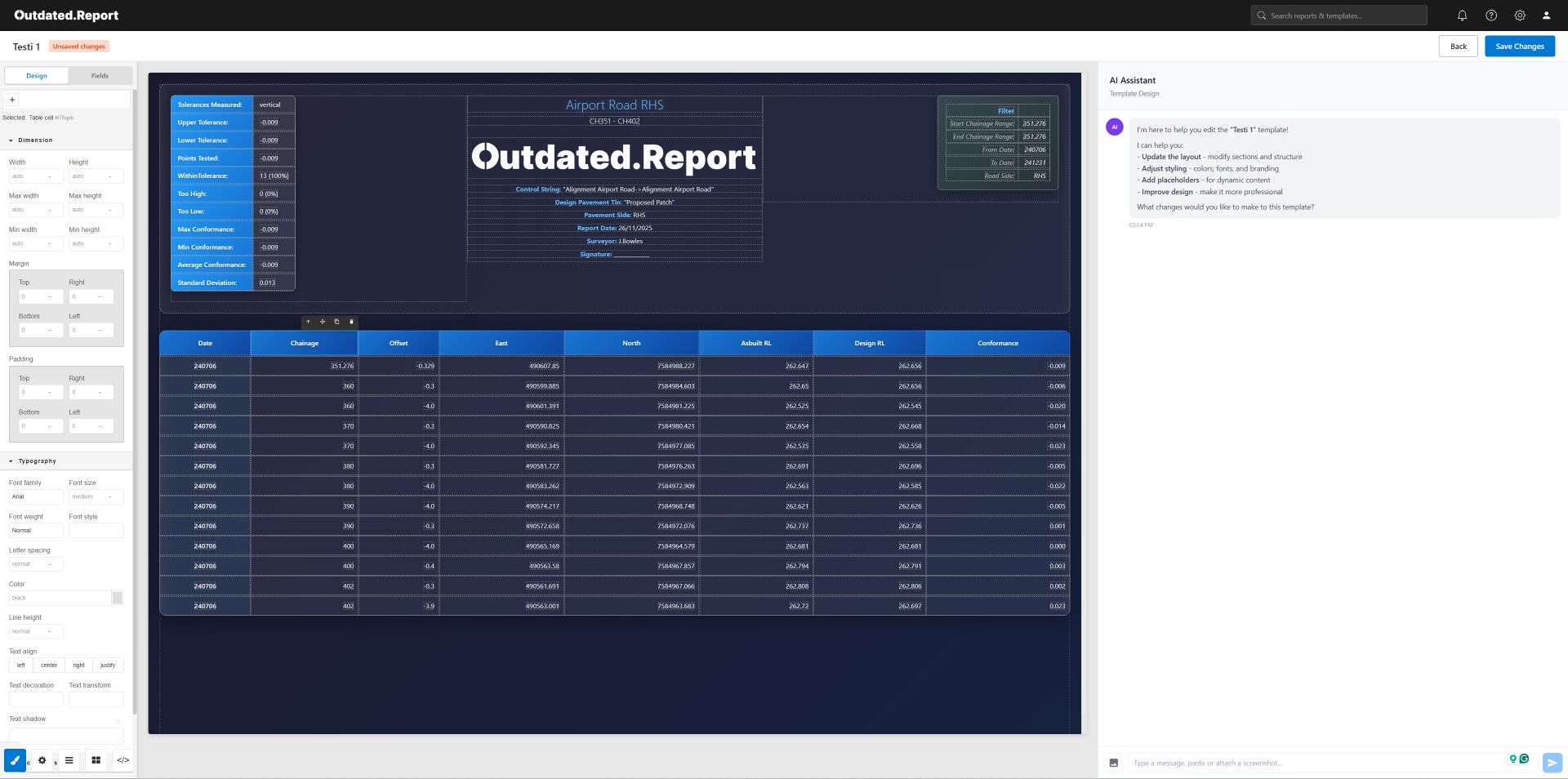
Preview your template in the visual editor. Happy with it? Save it as-is. Want changes? Just ask. The AI executes your requests in real-time. Iterate until it's exactly right.
Generate Perfect Reports Forever
Your template is saved with all field mappings, calculations, and AI prompts locked in. When new data comes in: upload it, click generate, download your perfect report.
Smart Fields: Where Automation Meets Intelligence
Regular templates fill in blanks. Smart Fields do the thinking for you.
Calculation Fields
Let the Math Do Itself
The AI scans your document and identifies every manual calculation: totals at the bottom of columns, percentage changes, averages, variances, running totals. Each one becomes a Smart Field that calculates automatically from your source data.
AI Fields
Add Intelligence with a Prompt
Insert AI-generated content anywhere in your report. Each AI Field includes a custom prompt that runs fresh every time you generate.
From This to This. One Sentence.
Your existing reports are just the starting point. Tell the AI what you want, and watch it transform:
If You Make It More Than Once, We Can Automate It
Outdated.Report works for any document where the format stays the same but the data changes. Here's what our users are automating:
As a land surveyor, I still work with companies that depend on primitive, outdated reporting methods. There's still a lot of copying and pasting and manual formatting: putting extra spaces in copied .txt data so it lines up well in a Microsoft Word document, then copying logos, doing manual calculations, then saving as a PDF.
Then doing that exact same time-wasting process again the next day for the next report.
I knew this had to be the case in other industries too. Engineers, accountants, inspectors, consultants: anyone who creates regular reports is probably doing the same tedious manual work I was.
So I built Outdated.Report. The name says it all: your current reporting process is probably outdated. When you use this tool, you only have to do those manual edits once. Save the template and you're done. The next report is semi-automated: consistent appearance, less room for error, more professional output.
I built this because I was tired of wasting skilled time on unskilled work. If you are too, this is for you.
Built by Someone Who Lived This Problem
The Real Question: What's Your Time Worth?
If you spend 2 hours per week on manual report formatting:
Free
- 3 documents per month
- 3 saved templates
- 5MB file uploads
- Community support
Pro
- 50 documents per month
- 25 saved templates
- 25MB file uploads
- Priority support
- Advanced AI refinements
Enterprise
- Unlimited documents
- Unlimited templates
- 100MB file uploads
- Dedicated support
- Custom integrations
- SSO/SAML
Questions? We've Got Answers.
My reports are complex with lots of conditional formatting. Can this handle that?
If you can create it manually, we can automate it. Our AI handles complex headers, nested tables, conditional sections, and multi-part documents. Upload an example and see for yourself: the first three reports are free.
What file formats do you support?
For input documents: Word (.docx), PDF, Excel (.xlsx), images (.png, .jpg), and more. For data sources: Excel, CSV, JSON. For output: HTML, PDF, and we're adding more formats regularly.
What if I like my current format and don't want AI suggestions?
No problem. The AI suggestions are optional: accept them with a click or ignore them entirely. You can use Outdated.Report as pure automation without any transformation if that's what you need.
How long does it take to set up a template?
Most users create their first working template in under 5 minutes. Upload your example, upload your data, review the AI's mapping, make any adjustments, and you're done.
Is my data secure?
Yes. All data is encrypted in transit and at rest. We process your files securely and don't share your data with anyone. Enterprise plans include additional security options including SSO/SAML.
What if the AI maps fields incorrectly?
You can adjust any field mapping manually in the visual editor. The AI gets it right most of the time, but you always have full control to make corrections.
Can I collaborate with my team?
Yes: templates can be shared with team members. Everyone uses the same template, ensuring consistent output across your organization. Enterprise plans include advanced team management features.
What are Smart Fields exactly?
Smart Fields are special template fields that do more than just insert data. Calculation Fields automatically compute totals, averages, percentages, etc. AI Fields run a custom prompt each time you generate like "summarize this data in one paragraph." They make your reports intelligent, not just automated.
What if my source data format changes?
You can update your field mappings anytime. If columns move or new fields appear, just re-map them in the editor. Your template structure stays intact.
Is there a limit to how complex my AI Field prompts can be?
AI Fields support detailed prompts. You can ask for summaries, insights, recommendations, plain-English explanations, anomaly detection: whatever adds value to your report. The AI processes each prompt fresh with every generation.
Can I try it before committing?
Absolutely. The free tier gives you 3 reports per month forever: no credit card required. Test it with real documents and real data before deciding if you need more.
Do you offer refunds if I'm not satisfied?
Yes. We offer a 30-day money-back guarantee on all paid plans. If you're not completely satisfied with Outdated.Report within the first month, contact us for a full refund, no questions asked.
Ready to Create Your Last Manual Report?
Upload what you have. Let AI map your data, automate your calculations, suggest improvements, and generate perfect reports forever.
The average worker loses 60 hours a month to manual reporting tasks. That's 60 hours you could spend on work that actually matters.
3 free reports/month • No credit card • Setup in under 5 minutes